Education
Workflow Studio: Building Multi-Step Automation in ServiceNow Canvas
May 30, 2026
Introduction
Modern enterprises no longer depend on isolated scripts to manage digital operations. Inside ServiceNow, Workflow Studio gives you a visual orchestration layer where you can design multi-step automation across IT, HR, security, and customer workflows without touching complex backend logic. You work with connected workflow blocks, event triggers, data pills, and decision branches. Manual processing time reduces significantly with this approach. As a result, professionals can maintain consistent execution across all enterprise systems. The ServiceNow Classes are designed for beginners and ensure the right as per industry standards.
Understanding Workflow Studio Architecture
Workflow Studio in ServiceNow Canvas comes with a node-based orchestration engine. Every workflow has several connected execution stages. These stages process requests, validate all conditions accurately, and trigger downstream actions to improve efficiency.
The platform mainly operates on these technical layers:
Component | Technical Function |
Trigger Engine | Detects events, schedules, or API calls |
Flow Designer Runtime | Executes workflow actions sequentially |
Data Pill Mapper | Transfers dynamic data between tasks |
Integration Hub | Connects external platforms through connectors |
Decision Engine | Evaluates conditions and routing logic |
You are not simply dragging blocks visually. Behind the interface, ServiceNow creates execution metadata, transaction context, and runtime state management for each workflow instance.
Designing Multi-Step Automation Flows
When you build enterprise automation, the workflow rarely follows a straight line. Workflow Studio supports conditional branching, asynchronous execution, and parallel processing.
A standard enterprise flow includes the following elements:
Triggers based on events
Approval orchestration
Accurate SLA monitoring
Assignment logic
Synchronization of External APIs
Actions to recover Errors
Notification pipelines
For example, imagine an employee onboarding workflow:
The HR department submits the onboarding request
The identity system generates a user account
The laptop request is sent to procurement
Access roles get assigned by the Security teams
Manager gets an approval notification
Workflow checks for the completion status
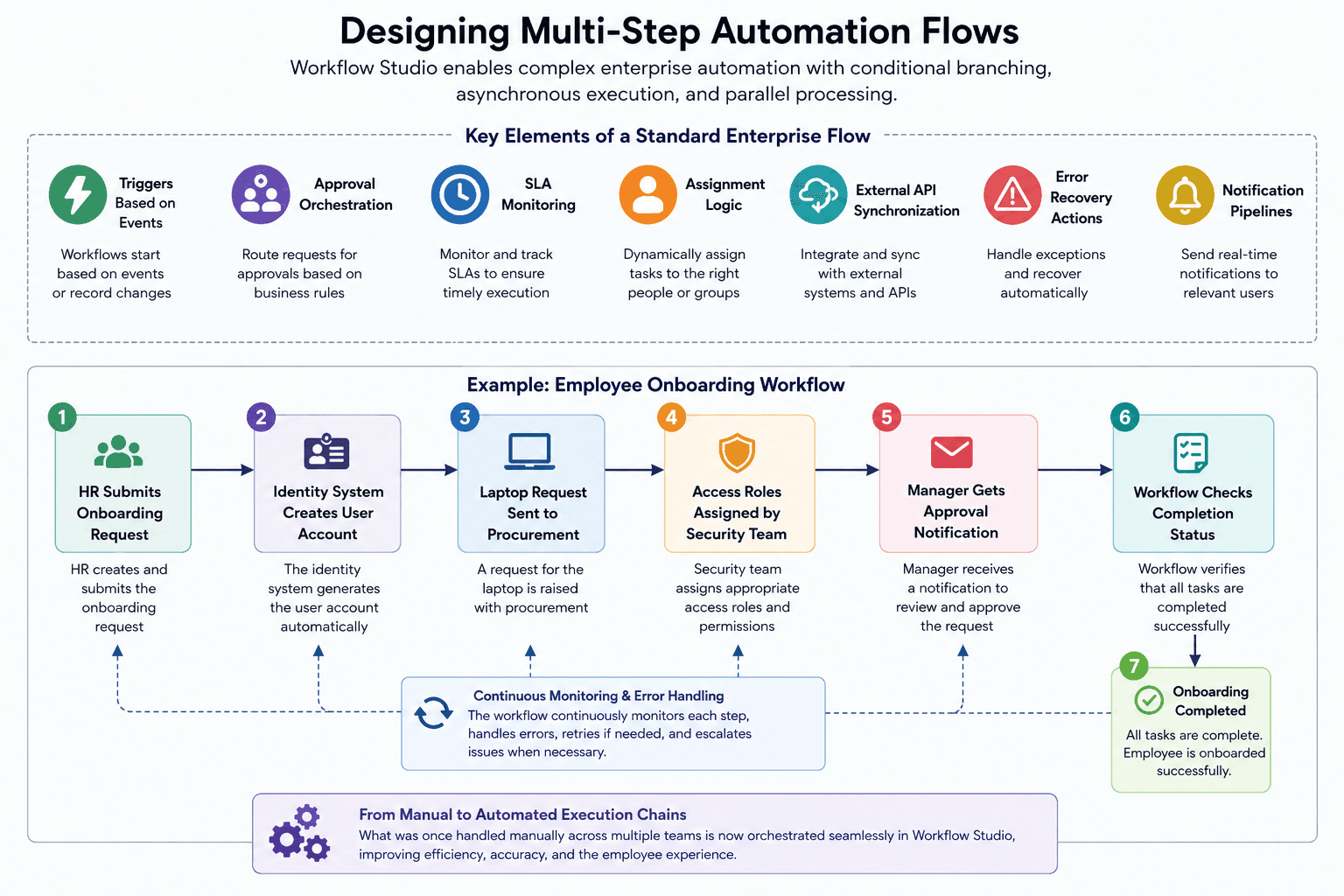
Previously, the above tasks happened manually. Now Workflow Studio coordinates these tasks using automated execution chains.
Beginners can join the ServiceNow Course for ample hands-on training opportunities using ServiceNow Canvas.
Using Data Pills for Context Propagation
One of the most powerful technical features inside Workflow Studio is the Data Pill system. A data pill represents runtime information generated during execution. Professionals can pass this information across all workflow stages without the need to manually define all variables.
Examples include:
Employee ID
Number of the Incident
Approval status
Details of the cloud instance
Asset serial number
For example, if a workflow gets a ticket ID from an ITSM trigger, users can inject that ticket value directly into email templates, approval tasks, API payloads, etc.
As a result:
Hardcoded configurations reduce
Lesser amount of data duplication
Lower errors in mapping
Reduced efforts for manual synchronization
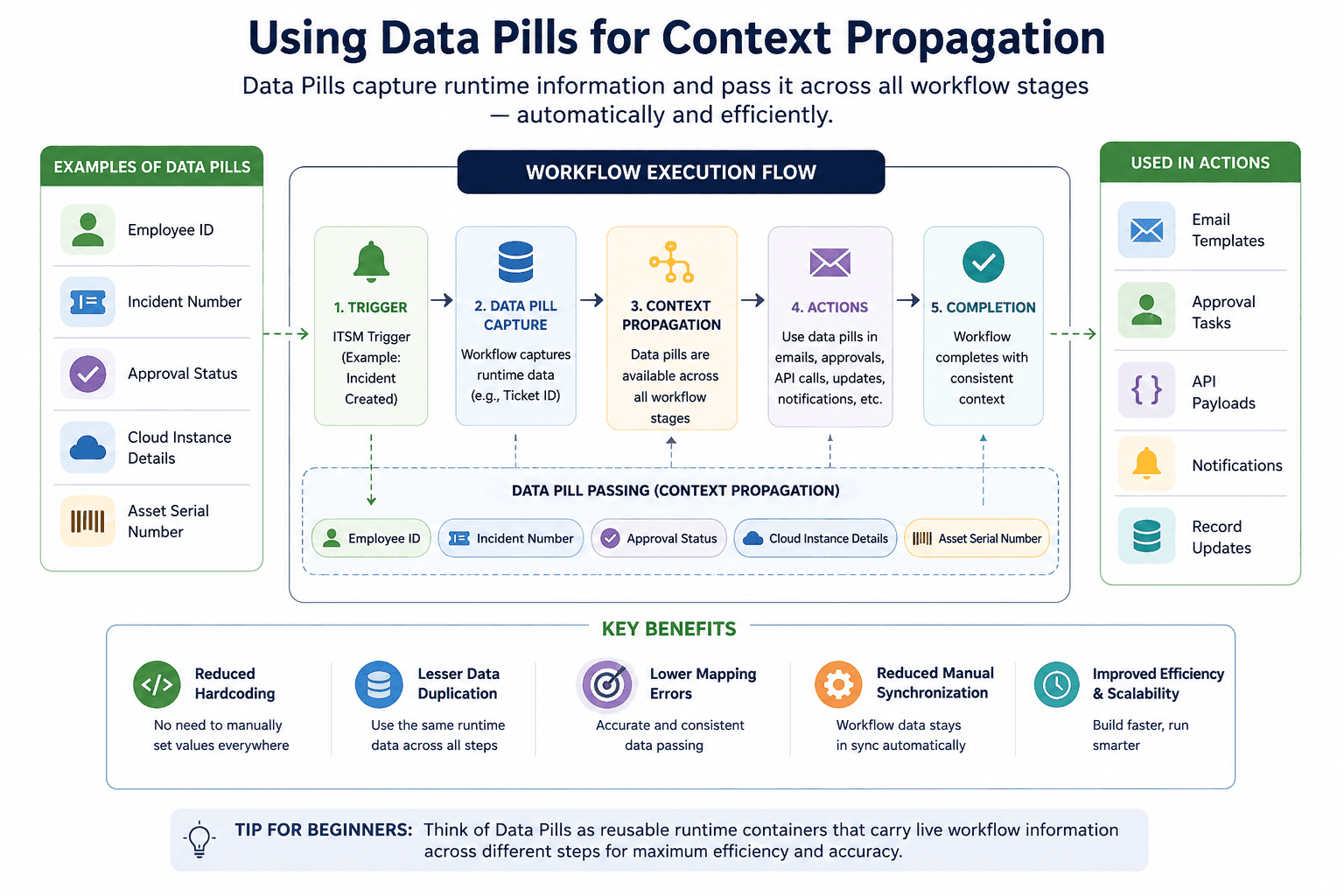
Beginners may consider data pills as reusable runtime containers. These containers carry live workflow information for efficiency.
Implementing Conditional Logic and Branching
Enterprise automation becomes more powerful when workflows adapt dynamically.
Workflow Studio supports:
If-Else branching
Nested conditions
Paths for parallel execution
Loop processing
Exception routing
Here is a simplified logic structure:
Condition | Workflow Action |
High Priority Incident | Escalate to L2 Support |
Security Threat Detected | SOC workflow gets triggered |
Approval Rejected | Request automatically closes |
SLA Breach Risk | Escalation notifications are sent out |
Runtime conditions are constantly evaluated by the system. For this, workflow context variables are used. This enables teams to create adaptive automation instead of static task chains.
One can check the ServiceNow Admin Course to understand the course structure and join a training program for the best hands-on learning facilities guided by expert mentors.
Integration Hub and External System Connectivity
Combining Workflow Studio with Integration Hub improves efficiency to a great extent.
Integration Hub enables:
REST API communication
SOAP integration across systems
Orchestrating Cloud services
Synchronizing Databases
Third-party SaaS connectivity
You can integrate systems such as the ones below:
Microsoft Teams
Jira
AWS
SAP
Salesforce
In case a cloud monitoring tool detects instability across server. Workflow Studio can:
Create an incident
Notify DevOps
Trigger remediation workflow
Update CMDB records
Generate audit logs
All these actions execute inside one orchestrated pipeline.
Error Handling and Workflow Resilience
Large automation systems fail without proper exception management. Workflow Studio includes execution safeguards to prevent incomplete transaction states.
Important resilience mechanisms include:
Using retry policies
Performing timeout configuration
Detecting the Failure branches
Performing rollback activities
Logging Execution
Tracking audits
In case of a temporarily failed API integration, the workflow retries automatically rather than terminating the task immediately.
This ensures:
Better system reliability
Consistency in workflows
Better compliance tracking
Stability on Operations
Professionals need to design the fallback paths when building automation at the production level.
Performance Optimization in Workflow Canvas
As workflows grow, execution performance becomes more vital.
Perform the tasks below for advanced optimization:
Reduce all unnecessary workflow loops
Synchronous API calls must be reduced
Parallel task execution must be used
Limit excessive data transformations
Reuse the subflows for better modular design
Subflows refer to the reusable workflow modules. Professionals can build one reusable component and use it across workflows. This enables professionals to stop recreating approval logic repeatedly.
Systems become easier to maintain
Scalability improves
Execution becomes more effective
Governance becomes consistent
Conclusion
Modern professionals use Workflow Studio to transform ServiceNow Canvas into a centralized enterprise automation engine. This enables users to build intelligent execution pipelines. As a result, professionals no longer need isolated task automation. Decision logic, triggers, integrations, and runtime data propagation combine in Workflow Studio. This enables professionals to automate complex operations. The ServiceNow Training in Noida offers state-of-the-art learning facilities for the best guidance in this field. To use it effectively, one must understand data pills, branching logic, integration orchestration, etc. These skills enable one to design scalable workflows to reduce manual dependency. As a result, enterprise-wide processes become more reliable.