Education
How SAP FICO AI Tools Make It Easy to Automate Accounts Payable & Receivable?
May 18, 2026
Currently, the world of corporate finance is moving away from manual data entry, endless spreadsheets, and slow approval chains. In the past, finance teams spent most of their time matching the invoices, chasing the payments, and solving human errors. Today, Artificial Intelligence has completely changed things.
When you integrate the AI tools into the SAP FICO module, businesses will be able to fully automate the accounts payable and Accounts Receivable workflows. This shift not only saves a huge amount of time but also ensures total accuracy in the financial reporting. Well, if you are looking to learn how all this works, then taking the SAP FICO Course can help in the same. This course is the best way to master these modern automation systems and stay ahead of the competition.
The AI Architecture Behind SAP FICO Automation:
As the AI is getting adopted, taking the SAP FICO Classes in Pune can help understand this architecture easily.
1. SAP Joule - The AI Copilot
SAP Joule is a built-in digital helper inside the S/4HANA system. Instead of forcing workers to remember complicated codes to find financial data, Joule lets people ask normal questions. A worker can type simple questions about outstanding customer bills or total amounts owed to vendors, and the system pulls up the correct data right away. This tool makes it easy for both accounting experts and regular managers to get the financial numbers they need without digging through confusing menus.
2. SAP Business Technology Platform (BTP)
BTP acts as a bridge that lets companies connect their own custom software and automated software bots directly into SAP FICO. This means businesses do not have to rely only on the standard features that come with SAP. They can build or add unique tools that fit the exact way their teams handle incoming and outgoing payments.
Automating Accounts Payable with SAP FICO AI Tools
Intelligent Invoice Capture and Processing
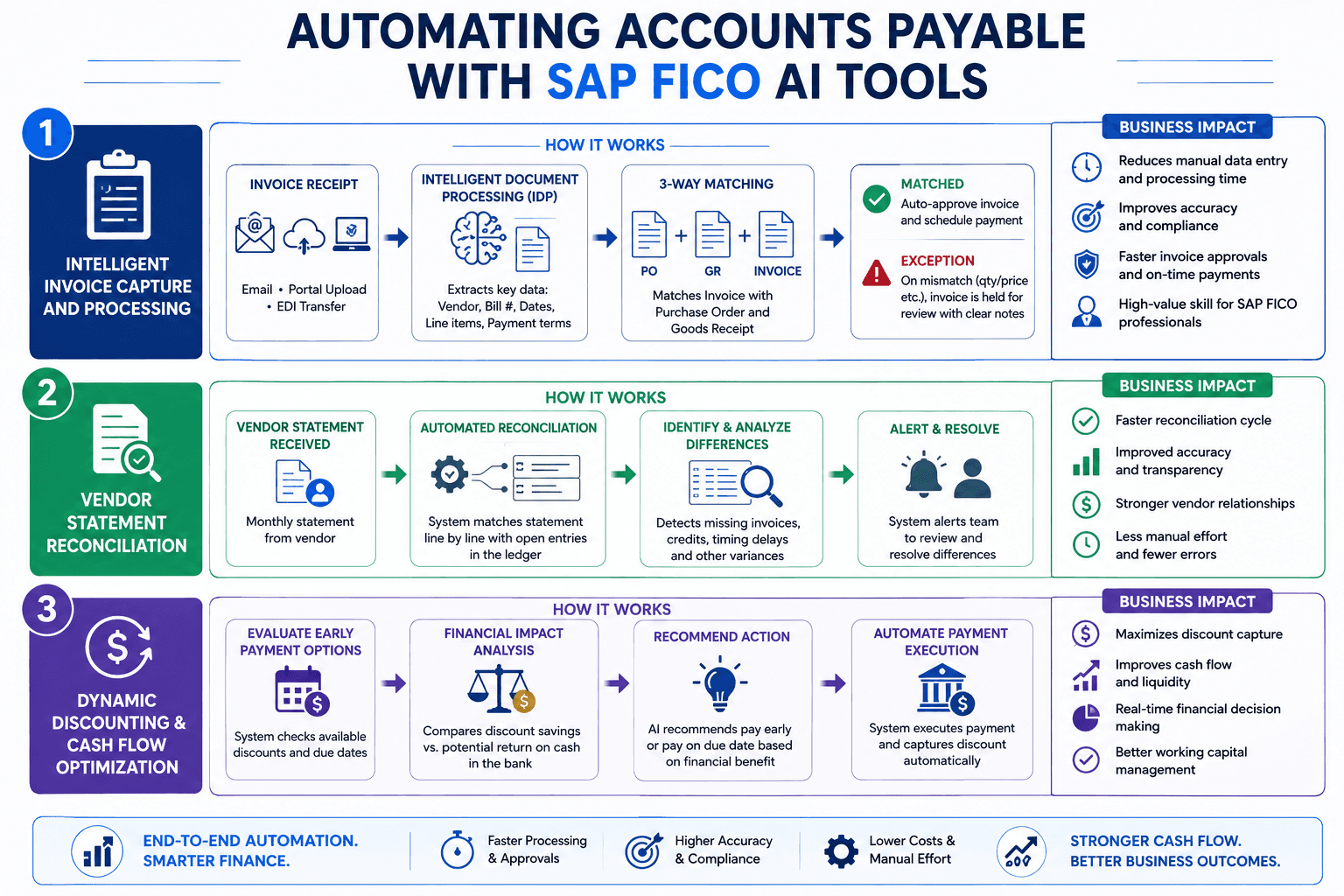
Typing vendor invoice data into a system by hand takes up hours of basic office time. SAP FICO uses a tool called Intelligent Document Processing (IDP) to handle this workload.
When the invoice arrives through an email attachment, a portal upload, or a digital transfer, the system will scan the documents on its own. Also, this tool can find out the main details such as the vendor’s name, bill number, dates, line items, and payment conditions. Next, the software checks the information against the original purchase order and the Goods Receipt in the file.
If any of the three files get matched, the system will approve the invoice as well as schedule the payment without the need for a person to look at this. If something is off, then the incorrect item count or a piece that is too high, the system will hold the bill for review and will leave a clear note that explains the issue.
For anyone currently going through SAP FICO Training, learning how to set up these acceptable error limits, manage document types, and control this automated workflow is a highly valuable skill for landing corporate roles.
Vendor Statement Reconciliation
Comparing monthly vendor statements against internal accounting records by hand is a slow process that easily leads to mistakes. SAp FICO automates these tasks by aligning with the vendor statements line by line with the open entries in the ledger. It can instantly identify and discuss the differences caused by the missing invoices, credits, or timing delays, and then alert the team to solve them.
Dynamic Discounting and Cash Flow Optimization
The system uses automated tools to calculate when paying a supplier early makes financial sense. It checks if an early payment discount saves the company more money than keeping that cash in the bank would earn. This type of real-time balance sheet management used to require constant spreadsheets and hours of manual math from finance teams.
Automating Accounts Receivable with SAP FICO AI Tools
AI-Powered Dunning and Collections
Chasing unpaid customer invoices is a major headache for any collections team. While SAP FICO has always used a payment reminder system called the Dunning Program, automation makes these reminders much more personalized.
For students working toward an official SAP FICO Certification, knowing how to configure these smart dunning workflows is a standard topic on modern exams, reflecting the corporate shift toward automated finance systems.
Automated Cash Application
Matching incoming bank payments to open customer invoices is one of the most tedious jobs in accounting. Typically, clerks have to look at bank statements and guess which invoice a customer is trying to pay, especially when the payment reference details are missing or messy. The Cash Application tool inside S/4HANA handles this matching work with high accuracy. Also, this review examines the historical payment trends, amounts, and the same amount to apply the cash to the right accounts.
Conclusion:
SAP FICO remains a basic backbone of the large companies worldwide. Still, the addition of the automated document readers, system-based payment matched and predictive risk tools can turn into a self-optimizing platform. Well, this change can handle the heavy burden of the manual data entry off accounts payable and accounts receivable teams while bringing a level of speed as well as accuracy.